How to Timestamp a Document and Prove When It Existed
In short
File dates and emails to yourself are easy to fake. A real timestamp ties the file's exact fingerprint to a time recorded by someone else, and anyone can check it later. You can do that for free with a timestamp authority (RFC 3161) or a public blockchain, in a few minutes.
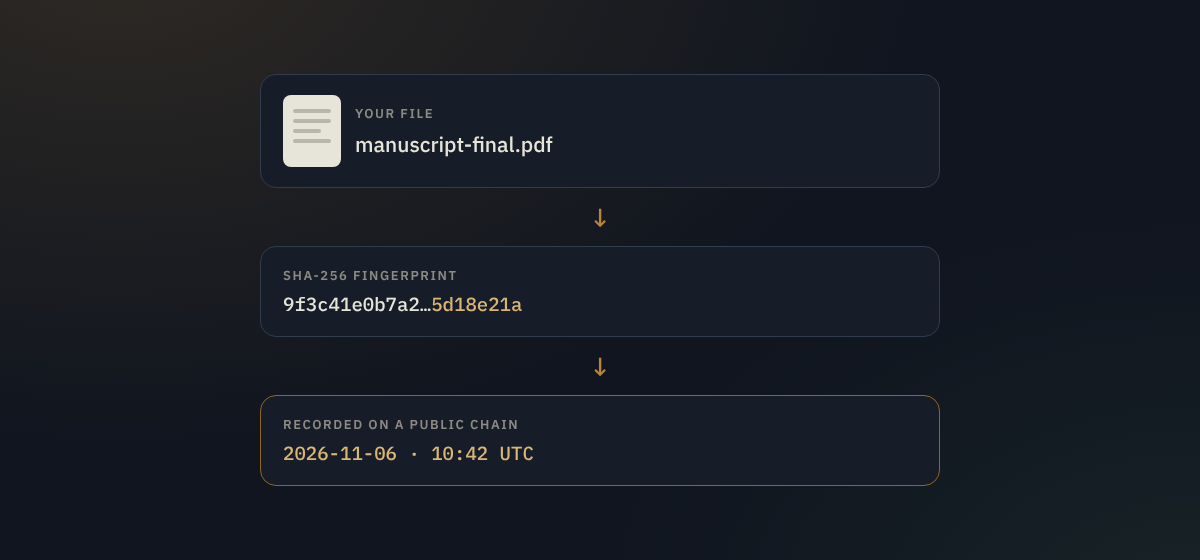
You finish a manuscript, a logo, a business plan or a contract draft, and you'll soon show it to someone. If there's ever a dispute about who had it first, or whether it was changed afterwards, you'll want evidence that this exact version existed on this date. That's what a document timestamp gives you.
This guide explains what a timestamp has to do to be worth anything, which common methods fall short, and how to make a proper one, step by step, mostly for free.
What a useful timestamp needs
A timestamp is only as good as the answer to "why should anyone believe this date?" A useful one has four properties:
- It is tied to the exact content. Not to a file name or a folder, but to the bytes of the file. In practice that means a cryptographic fingerprint (a hash, usually SHA-256) that changes completely if a single character changes.
- The time comes from someone other than you. If you control the clock, you can set the date to whatever you like.
- Anyone can check it later. A judge, a client or a journal editor should be able to verify it without trusting your word.
- It outlives the service. Ideally the proof still works if the company that made it disappears.
Keep those four points in mind and the popular shortcuts are easy to judge.
Methods that don't hold up well
The file's "created" or "modified" date
Your computer shows a date for every file, but it records whatever the system clock said, and it can be changed in seconds with built-in commands or by simply changing the clock. Copying, downloading or zipping a file often resets it too. It fails the second and third tests.
Emailing it to yourself
An email in your inbox carries a date, and the provider's records are harder to fake than a file date. But the proof sits in an account you control, it ties the date to an attachment rather than to a fingerprint anyone can recompute, and getting the provider to confirm its logs is slow and uncertain. It's better than nothing, not much more.
Posting a copy to yourself
The sealed-envelope trick, often called "poor man's copyright", has a reputation it doesn't deserve. Quoting the US Copyright Office, Nolo notes that "there is no provision in the copyright law regarding any such type of protection", and that the practice is no substitute for registration (Nolo). Envelopes can also be opened and resealed.
Commit dates in Git or a cloud folder's version history
Version history is excellent for your own records, but the dates come from your machine or your account. Git, for example, lets you set any commit date you want with a single option. Treat these as supporting evidence, not proof.
Method 1: A trusted timestamp authority (RFC 3161)
A timestamp authority (TSA) receives your file's fingerprint, adds the current time and signs both with its certificate. The protocol is a long-established internet standard, RFC 3161. You never send the file itself, only its hash, so the content stays private.
In the European Union, a qualified electronic timestamp from a certified provider carries a legal presumption of accuracy for its date and the integrity of the data under the eIDAS regulation (eIDAS, Article 41). Qualified timestamps are paid services, but free authorities exist for everyday use. FreeTSA describes itself as "a free Time Stamp Authority" and documents the commands for using it with OpenSSL:
# 1. Make a timestamp request from your file's hash
openssl ts -query -data contract.pdf -no_nonce -sha512 -cert -out contract.tsq

# 2. Send it to the authority and save the signed response
curl -H "Content-Type: application/timestamp-query" --data-binary '@contract.tsq' https://freetsa.org/tsr > contract.tsr

# 3. Later, verify (after downloading FreeTSA's tsa.crt and cacert.pem)
openssl ts -verify -in contract.tsr -queryfile contract.tsq -CAfile cacert.pem -untrusted tsa.crt
Keep the .tsr file next to the original. If you sign PDFs, Adobe Acrobat can also add trusted timestamps from a timestamp server as part of the signature (Adobe).
The weak point: the proof depends on the authority's certificate. If the authority shuts down or its certificate is withdrawn, checking old timestamps gets harder.
Method 2: Anchoring the fingerprint on a public blockchain
The other approach writes the file's fingerprint into a public blockchain. Once the block is confirmed, nobody, not even the service that wrote it, can alter it or back-date it, and anyone can check it against the public record without an account. That covers all four tests above, including surviving the service.
OpenTimestamps is a free, open-source way to do this on Bitcoin. As its site puts it, "a timestamp proves that some data existed prior to some point in time" (OpenTimestamps). You can stamp a file on the website or with its command-line client; the proof becomes complete once it is included in a Bitcoin block, which usually takes a few hours.
Doc Notary (this site) does the same job through a simple web page, with a PDF certificate and a public verification link:
- Create a free account (three notarizations a month).
- Drop the file on the home page. Your browser calculates its SHA-256 fingerprint.
- Choose whether to store a private copy of the file for later download, or tick Record fingerprint only so the file never leaves your device (this works for files of any size, including long videos).
- Notarize. The fingerprint and time are recorded on the blockchain and you can download a PDF proof certificate.
- To check a copy later, anyone drops it on the verify box. A match shows the recorded time.
Doc Notary is in beta and currently records proofs on the Ethereum Sepolia test network, with a planned move to a production network.
Method 3: A notary, when you need a signature
A notary public checks a person's identity and witnesses a signature. That's the right tool for deeds, affidavits and forms the law requires to be notarized, but a notary vouches for who signed, not for when a draft or a design existed. For a deeper comparison, see Notary, Content Credentials or blockchain timestamp?
Which method should you use?
| Timestamp authority | OpenTimestamps | Doc Notary | |
|---|---|---|---|
| Cost | Free (FreeTSA) to paid (qualified) | Free | Free plan; US$5/month for more |
| Skill needed | Command line, or a PDF signing tool | Website or command line | Web browser |
| Time to finish | Seconds | A few hours | About a minute |
| Who must you trust? | The authority | Nobody: Bitcoin is public | Nobody: the chain is public |
| Legal weight | Strong in the EU when qualified | Accepted case by case | Accepted case by case |
| Proof you keep | .tsr file | .ots file | PDF certificate and verify link |
For a contract in the EU where the date matters legally, use a qualified provider. For everything else, a free authority or a blockchain timestamp is plenty, and doing both costs nothing.
A five-step routine that works
- Finish the version you want to protect. Every later edit produces a different fingerprint, so timestamp each version that matters.
- Keep an untouched original. Don't re-save, compress or convert it. Send copies to people "as a document" rather than through apps that shrink images and video.
- Timestamp it straight away, before you share it.
- Store the proof next to the file: the
.tsr,.otsor PDF certificate. - Back up both somewhere separate, such as cloud storage plus an external drive.
What a timestamp can't prove
A timestamp shows that a file with exactly this content existed by a certain time. It doesn't show who created it, who owns it, or that nobody had it earlier. It is also not legal advice or a legal notarization. Check what your court, client or publisher accepts, and combine a timestamp with other evidence, like drafts, emails and witnesses, when the stakes are high.
Timestamp a file now
Drop a file on Doc Notary to record its fingerprint, free, or check a copy you've been sent. Verification never needs an account, and the file is fingerprinted in your browser.
Timestamp a file How to check a file