How to Check If a File Has Been Changed
In short
Don't trust a file's date or size. Calculate its SHA-256 fingerprint and compare it with a fingerprint you trust: one the sender published, one you recorded earlier, or one fixed on a public record. Identical fingerprints mean identical files, byte for byte.
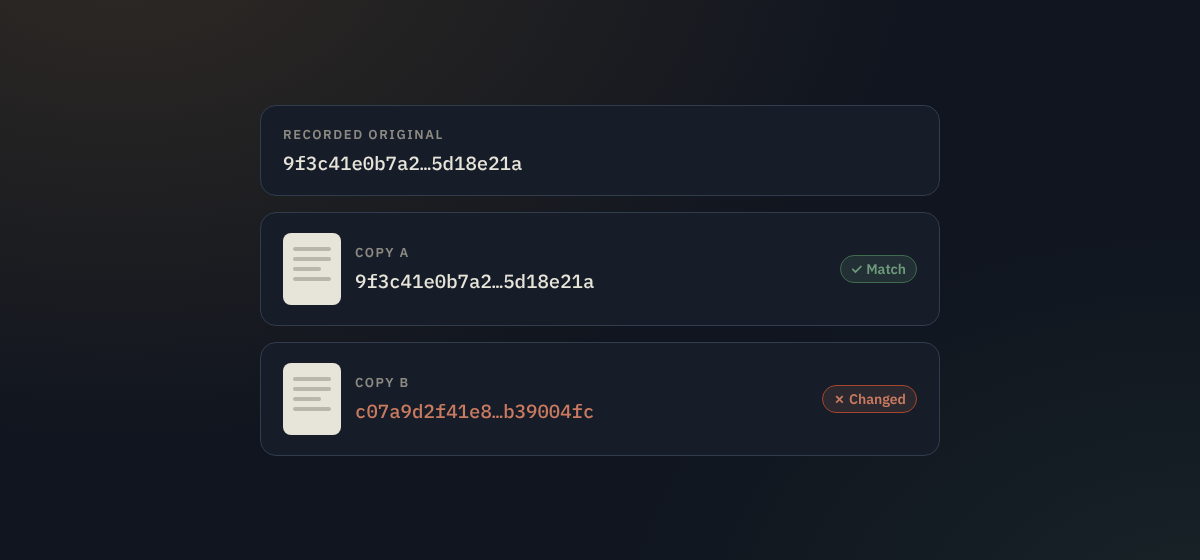
Someone sends you a signed contract and you want to be sure it's the version you agreed. A video is going around and you need to know whether it's the original or an edited copy. You download a program and want to know it hasn't been tampered with on the way. Each time, the question is the same: is this file exactly the one it's supposed to be?
You can answer that yourself in under a minute, with tools already on your computer or phone. Here's how, and how to read the result correctly.
Why dates and sizes don't tell you
The "modified" date your computer shows is simply what the clock said when the file was last saved, and it can be set to anything. Copying or downloading a file often changes it as well. File size is no better: change one word for another of the same length and the size stays identical. To know whether the content changed, you have to look at the content itself.
Fingerprints: the reliable way
A cryptographic hash function reads every byte of a file and produces a short, fixed-length value called a hash, checksum or fingerprint. For SHA-256, the function defined by the US standards body NIST in its Secure Hash Standard (FIPS 180-4), it's always 64 characters, such as:
3cbcfddec145e3382d592266be193e5be53443138ee6ab6ca09ff20df609e268Three properties make it useful:
- The same file always gives the same fingerprint, on any computer, in any program.
- Any change gives a completely different one. Edit a comma and the whole value changes, not just one character.
- You can't work backwards. The fingerprint reveals nothing about the content, so it's safe to share.
Microsoft's documentation sums up the point: "the purpose of hash values is to provide a cryptographically-secure way to verify that the contents of a file have not been changed" (Microsoft Learn).
How to get a file's fingerprint
Windows
Open PowerShell (search for it in the Start menu) and run the command below with your own file's path. It uses SHA-256 by default.
Get-FileHash "C:\Users\you\Downloads\contract.pdf"The older Command Prompt has an equivalent:
certutil -hashfile "C:\Users\you\Downloads\contract.pdf" SHA256Mac
Open Terminal, type shasum -a 256 (with a space at the end), drag the file onto the window to fill in its path, and press Return.
shasum -a 256 ~/Downloads/contract.pdfLinux
sha256sum contract.pdfPhone, or without a command line
Drop the file on the verify box on Doc Notary. Your browser calculates the SHA-256 fingerprint on your own device; the file isn't uploaded, and you don't need an account. If that exact file was ever notarized, you'll also see when it was recorded.
What to compare it with
A fingerprint on its own tells you nothing. You need a trusted value to compare it with, and that value must come from somewhere other than the file you're checking:
- A checksum the publisher lists on its download page, for software and datasets.
- A fingerprint you recorded yourself before sending the file out.
- One the sender gives you through a different channel, for example over the phone or in a separate message, so a person who tampered with the file couldn't also change the fingerprint.
- A timestamped record, from a timestamp authority or a public blockchain, which also tells you when that version existed. See how to timestamp a document.
Compare all 64 characters, not just the first few. Pasting both values into a text editor's search, or using the verify box, avoids misreading.
Reading the result
They match: the two files are identical, byte for byte. Nothing in the content has changed since the trusted fingerprint was made.
They don't match: something is different, but not necessarily something sinister. Common innocent causes include:
- The file was opened and saved again, even without visible edits. Many programs rewrite internal data on save.
- Photos and videos were re-encoded. Messaging apps and social networks usually compress media; WhatsApp, for example, compresses shared photos by default unless you send them as a document (gHacks).
- The file was converted, for example from Word to PDF, or exported again.
- Hidden information such as metadata or a different line-ending style changed.
- The download was incomplete or corrupted.
A mismatch tells you that you don't have the original. To decide whether anything meaningful changed, find the original or ask the sender for it, then compare again.
Avoid MD5 and SHA-1
Some sites still list MD5 or SHA-1 checksums. They catch accidental corruption, but they're broken against deliberate tampering: someone can craft two different files with the same fingerprint. The US CERT Coordination Center warns that "weaknesses in the MD5 algorithm allow for collisions in output" and advises avoiding it (CERT/CC VU#836068). Use SHA-256 whenever you have the choice.
Other checks worth knowing
- Digitally signed PDFs. Open the file in a PDF reader and look at the signature panel. It shows whether the document was changed after it was signed.
- Content Credentials (C2PA) on photos and videos. Some cameras and phones sign media when it's captured, recording the device and any edits. The credentials are often stripped when files are reposted, so a fingerprint check is still useful. There's more on that in Notary, Content Credentials or blockchain timestamp?
Make it a habit
The checks above only work if a trusted fingerprint exists. For anything important you create or receive, like contracts, manuscripts, original footage or design files, record its fingerprint the day you have it. Timestamping it on a public record does that and fixes the date at the same time, so whenever a copy turns up later, you'll know in seconds whether it's the real thing.
Check a file now
Drop a file on Doc Notary to see its SHA-256 fingerprint and whether it matches a recorded proof. The file stays on your device and no account is needed.
Check a file How to timestamp a file